Points & Rewards - Magento 1
- Former user (Deleted)
Firefox user notice:
Please use another web browser to view this document.
Sorry for the inconvenience.
Magento 2 Bambora APAC implements the Bambora payment method into any Magento store and provides the services for users from the APAC region. The extension allows processing payments secure and fast thanks to the PCI compliance and the SOAP API connection. All the credit card data inserted during checkout are kept solely in Bambora servers and are available for re-use only upon customer permission via Magento 2 Vault functionality.
Compatibility: Magento Open Source 2.2.X - 2.3.0, Magento Commerce 2.2.X - 2.3.0
Thank you for choosing Aheadworks!
Installing Magento 2 Bambora APAC
| Command Line Installation | Composer Installation |
|---|---|
1. Backup your web directory and store database 2. Download the Bambora APAC installation package 3. Upload contents of the Bambora APAC installation package to your store root directory 4. In SSH console of your server navigate to your store root folder: cd path_to_the_store_root_folder run: php -f bin/magento module:enable Aheadworks_BamboraApac then: php -f bin/magento setup:upgrade after: php -f bin/magento setup:static-content:deploy 5. Flush store cache; log out from the backend and log in again Make sure the installation is done from under the FTP administrator account. Otherwise, make sure to set 775 permissions to the store root directory after the extension is deployed. | If you are installing an Aheadworks product for the first time, you need to add our composer repository to your Magento store: 1. Login to your ssh console and navigate to your store folder:
cd path_to_the_store_root_folder
Run the following command:
composer config repositories.aheadworks composerhttps://dist.aheadworks.com/
After the command was executed successfully, you can use the composer to install the products. To install the actual product: 2. Login to your ssh console and navigate to your store folder:
cd path_to_the_store_root_folder
3. Run the following command to install the latest version of the extension: composer require aheadworks/module-bambora-apac if you need to install a specific version, run this command: composer require aheadworks/module-bambora-apac:<version> Specify the desirable extension version in <version> When prompted, enter Public Key (Username) and Private Key (Password): Both Public Key (Username) and Private Key (Password) can be found in the Composer Access page in your personal account on our site: 4. Enable the extension: php -f bin/magento module:enable Aheadworks_BamboraApac Next, register the extension: bin/magento setup:upgrade Recompile your Magento store if you are in the Production mode: bin/magento setup:di:compile To verify that the extension is enabled, run this command: bin/magento module:status Clean store cache, by running the following command: bin/magento cache:clean Log out and Log in the backend again. To upgrade the extension: 5. Write the upgrade instructions using the same approach, as above. 6. Make sure that the Composer finished the installation without errors. Flush store cache, log out and log into the backend again. |


Introducing the Magento 2 Bambora APAC extension
Bambora APAC for Magento 2 is a payment method tool aimed at providing high-level security and increased user-friendliness. As you can see in the title the service is available only for APAC users.
What is special in Aheadworks Bambora APAС for Magento 2 in comparison to similar extensions:
- Improvements in code structure;
- Full PCI Standard compliance;
- SOAP API request processing via Bambora WSDL;
- Magento 2 Vault support;
- Integrated into Magento 2 Advanced Subscription Products;
Configuring Magento 2 Bambora APAC
Extension Settings
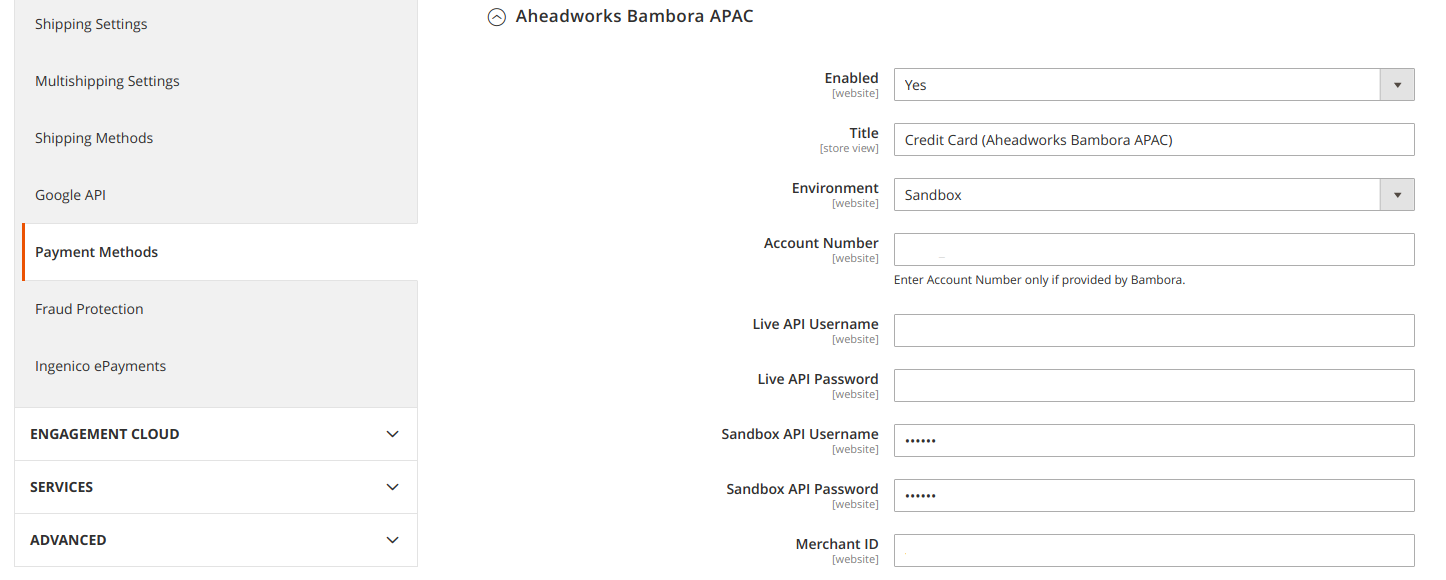
To configure the extension follow Stores > Configuration > Sales > Payment Methods > Aheadworks Bambora APAC.
Access
Setting up starts with enabling the payment gateway.
The title field shows the payment method name that will be displayed during the checkout.
The environment can be selected between sandbox and production. The first option allows you to test the payment method with the help of test credit card data, the second one implements the actual functionality to your store.
The following boxes are filled with the Bambora account credentials:
- Account Number;
- Live API Username;
- Live API Password;
- Sandbox API Username;
- Sandbox API Password;
- Merchant ID (the Custom Checkout Merchant ID/Merchant GUID for the second level of authentication. It will be provided to you with the rest of the info as part of the Bambora sign up process).
Magento 2 Vault
Magento 2 Vault can be enabled in the same setting section and gives you the ability to save customer credit data and provide it to them for use for later purchases.

Payments
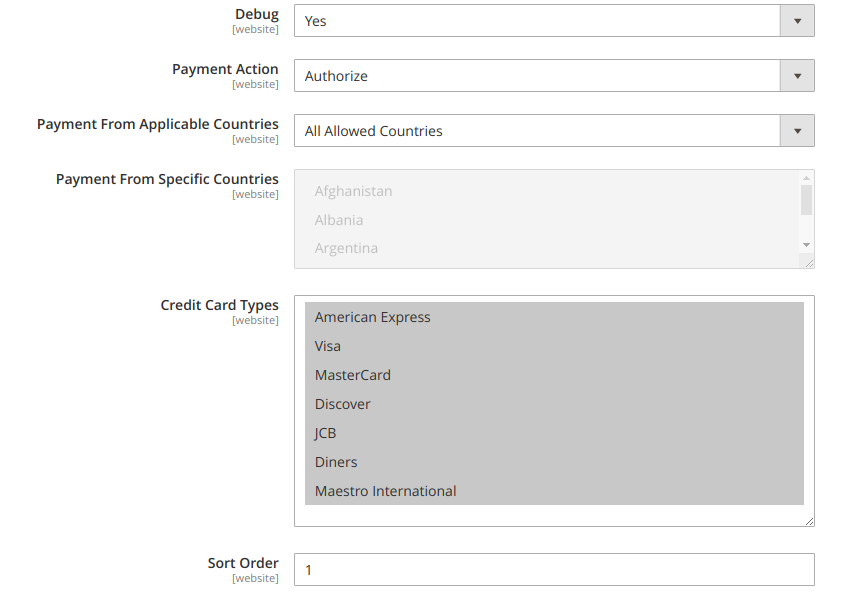
The debug functionality - if enabled - will include some transaction info into logs.
The Payment Action allows you to select the type of payment processing between the 'authorize' and 'authorize and capture'.
Payment from Applicable or Specific Countries - let you restrict some countries from using the Bambora checkout.
Credit card types supported by the payment method can be specified in the corresponding field.
The Sort Order option indicates the position of the method among others at the checkout page.
Checkout View
Bambora APAC for Magento 2 is integrated into the native Magento 2 checkout functionality and represents a design that all the Magento 2 users are familiar with.
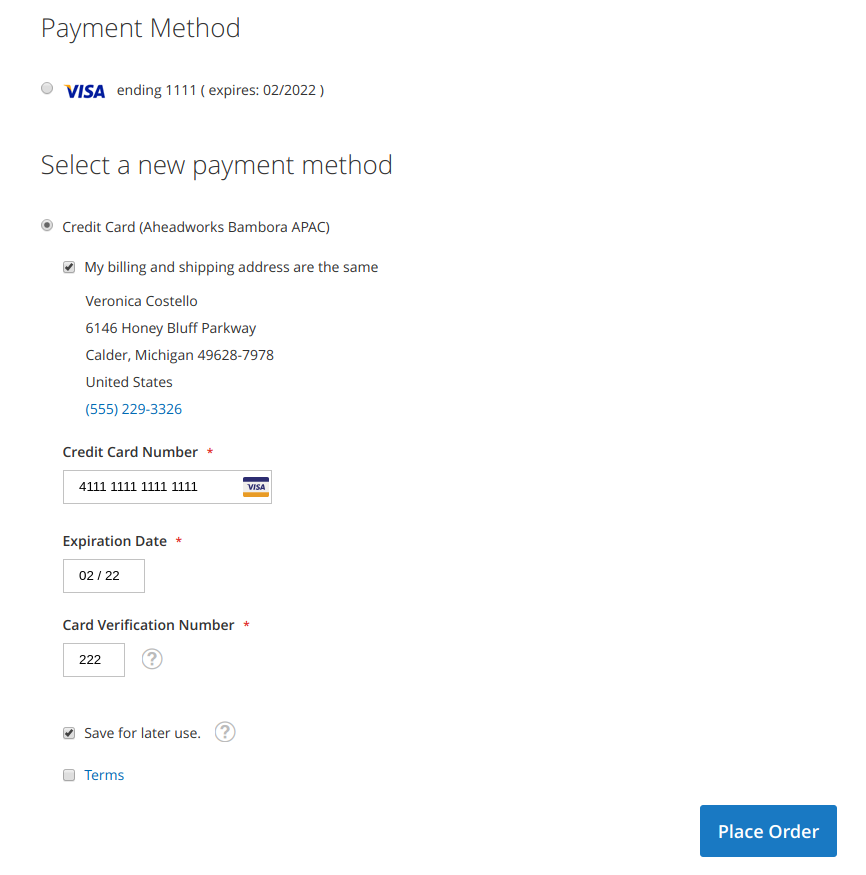
Save for later use - is a checkbox provided by the Magento 2 Vault and allows to use the same credit card data without re-entering it.
A 'VISA' credit card payment method (see the top of the image above) is an actual representation of Magento 2 Vault functionality.
Need Customization?
.png?version=1&modificationDate=1563549705937&cacheVersion=1&api=v2)
You can always find the latest version of the software, full documentation, demos, screenshots, and reviews on http://ecommerce.aheadworks.com
License agreement: https://ecommerce.aheadworks.com/end-user-license-agreement/
Contact Us: http://ecommerce.aheadworks.com/contacts/
Copyright © 2019 Aheadworks Co. http://www.aheadworks.com